You launch a branded fuel delivery app by putting your company name on a working order-to-truck loop. Customers order gasoline or diesel in your app. Your driver takes the stop. You keep the customer list. Blink Fuel is the software for that job. It includes Tank Spotter, Custom Fuel App, and a custom website. Blink Fuel does not deliver the fuel.
This page is for US fuel-company owners who want to go live under their own brand. It is not a local service page. It does not rank other products. If you want fuel for your own car, you order from a company that already runs this software, not from Blink Fuel.
What does a branded fuel delivery app launch include?
A launch means a customer can open your app, order gasoline or diesel, pay, and get a truck from your yard. Your dispatch board sees the order. Your driver sees the stop on a phone. You keep the brand and the record. That is the loop you are turning on.
The software side is Custom Fuel App for ordering, Tank Spotter for the field worker, and a custom website that matches the app. Blink Fuel sells that whole product. Do not treat the consumer app as the only piece. If the driver phone and the public site are missing, you have not launched the business.
The Blink Fuel features page is the product list to check: easy ordering, payments in the app, push notices, live tracking, admin dashboard, driver management, route tools, and reporting. Ask to see those screens in your name on a demo.
You still own the trucks, the fuel, the insurance, and the people. Software does not skip those jobs. Blink Fuel does not sell you customers, accounts, territories, or locations.
What must you have before the app goes live?
You need permission to haul and sell fuel where you work, insured trucks, product supply, and trained drivers. The app does not replace a fuel license, a hazmat card, or a local permit. Check the current code text with your counsel and your local authority. A software demo is not a permit.
Line up the yard work first. Who fills the truck. Who takes a late call. Who owns the spill kit. Who can pull an order record the next morning. If those answers are fuzzy, wait. Turning the app on will not fix a thin operation.
Card processing and insurance sit with you. Encrypted payments are on the Blink Fuel features list. That is what the product page states. Confirm your payment path on the demo. Do not skip it.
This is a US product conversation. Your local rules still apply in your city and state. National software does not cancel a local rule.
How do you set up Custom Fuel App and Tank Spotter?
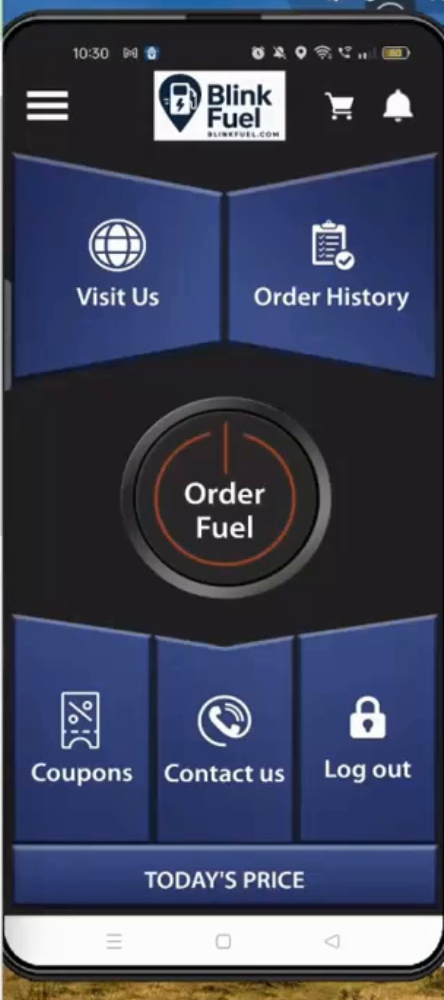
Custom Fuel App is the customer ordering layer. It carries your logo, your colors, and your company name. It lists in the iOS App Store and Google Play under your brand. Customers see you, not Blink Fuel. Tank Spotter is the field-worker side of the same house. Drivers get the stop, run the route, and mark the drop complete.
The custom website is the public face that matches the app. Ask what is in your copy on day one. Do not assume a later add-on will appear. Blink Fuel is Tank Spotter plus Custom Fuel App plus a custom website. That is one product, not three extras you buy later.
On the demo, place a gasoline or diesel order in a branded app. Watch the driver phone take that stop. Complete the drop and find the record on the board. If a screen is missing, you are not ready to launch.
Store listings take time. Apple and Google review apps. Plan that wait into the first weeks. The vendor can prepare the build. You still supply brand files, legal name, and store accounts.
What fuels can customers order at launch?
Plan for the fuels you sell. Blink Fuel works for all of them: gasoline (all grades), diesel (on- and off-road), heating oil, propane, kerosene, aviation gas and racing fuels. Your mix is still your business. Do not assume a fuel type is live until you have seen it on a demo of your own copy.
If you only run diesel for fleets, that is a setup choice, not a different product. If you add DEF for the same trucks, you stay on the same platform. Keep the launch list short. A clean order flow for the fuels you stock beats a long menu you cannot fill.
This page does not cover other fuel lines. Confirm product, tanks, and hose setup before you turn a fuel type on in the app.
How do you keep records after the first drop?
Keep the order, the driver, and the completion. The software stores those records so you can pull a date later. That helps when a customer, an insurer, or a local authority asks what happened. Records are not a license. They do not write the code for your city.
Ask to see the record after a complete drop. If the only proof is a text thread, you will feel that the first time someone asks you to show a date. Paper in the door pocket is not a plan for an on-demand service.
For the longer records job, read What records does a mobile fuel delivery business keep? Software is not a permit. Check the current code text before you treat any screen as compliance.
Office tools sit next to the driver phone. The admin dashboard is the one place to run the operation. Reporting tracks orders. Recurring delivery exists for fleets that want a repeating window. None of that replaces your own books.
How is a platform launch different from building the app yourself?
A from-scratch build means you pay for design, store accounts, dispatch, routing, payments, and years of fixes. A platform launch means you go live on software that already does those jobs. Blink Fuel is licensed software. You keep the brand, the customers, and the margin. There are no franchise fees and no per-delivery share to a network.
A custom build can still be right if you have a software team and years to wait. Most fuel operators do not. They need a working app, a driver phone, and a board they can run on Monday.
If you are still choosing a platform, use How to choose a fuel delivery app. If you want the category defined first, start with What is on-demand fuel delivery software? This page is the launch sequence, not those checklists.
A franchise path is a different choice. Read Blink Fuel versus a franchise model and Blink Fuel versus building it yourself if that is your choice. This page will not restate those tables.
What should you do in the first week?
In the first week, run a real gasoline or diesel order on a truck you control. Use your brand on the phone. Complete the drop. Pull the record. Fix anything that broke. Then take the next order. Do not wait for a perfect market.
Train the person who answers the phone and the person on the truck. Write down who owns a spill, a failed payment, and a late window. The app will not invent that playbook. You will.
Blink Fuel does not deliver fuel, does not sell you a territory, and does not promise profit. If a walkthrough leans on income claims, stop. The footer on this site already says results depend on your market, equipment, costs, and execution.
When you are ready for a walkthrough, request a demo, call 610-220-3906, or use the demo videos to see the order-to-delivery loop before a call.
Before launch, test your route assumptions in the fuel delivery calculator. Change the example fills, fuel margin, truck payment and staff costs to match your plan.
Last reviewed: September 2026
Author: The Blink Fuel team