Choose a fuel delivery app by the work it does on a real Monday: your brand on the phone, gasoline and diesel orders, a driver app, a dispatch board, and records you can pull later. Blink Fuel is built for that operator job. Price is public list, not a guess.
This is a national buyer guide for fuel-company owners. It is not a ranking of vendors and it does not name other products. Use it as a checklist on a demo. If a platform cannot show the item on a phone, treat that as a no.
Will Blink fit the way you sell fuel?
Bring one real order and your current office steps to the demo. Start with the fuels you sell now, then check the work you want to add.
- Adding diesel orders to your propane business? Ask to see a diesel order go from the customer screen to dispatch, the driver phone and the final delivery record. Check which fuels and delivery times you can offer.
- Keeping your heating-oil degree-day system? Walk through one will-call order with your current billing and autofill steps. Ask who moves the data and who checks it. Have the team show any link between the two systems; do not assume they connect. Read how to add a heating-oil app and keep your degree-day system.
- Already own tank monitors? Before buying, check whether your existing tank-monitor readings can reach the office screen. Bring your monitor model and a harmless sample reading, with fictional details only, to a connection-scope demo. Ask the providers to show the path to the proposed office screen and confirm the scope in writing. Owning a monitor does not prove a connection; leave any unshown step open. This does not confirm device support, an automatic feed, live tank levels or order creation.
- Putting your name on the app? Check your name and logo in the app store, order screen and website. Ask who owns the code and who can use or export your customer data. Get those terms in writing. Your logo alone does not mean you own the code. Read what your company name on the app means.
Sell more than one fuel? Walk through an order for each fuel you plan to offer. Write down any step you have not seen, then ask the team to show it. Use the demo request at the end of this checklist to review your orders.
What should you look for first?
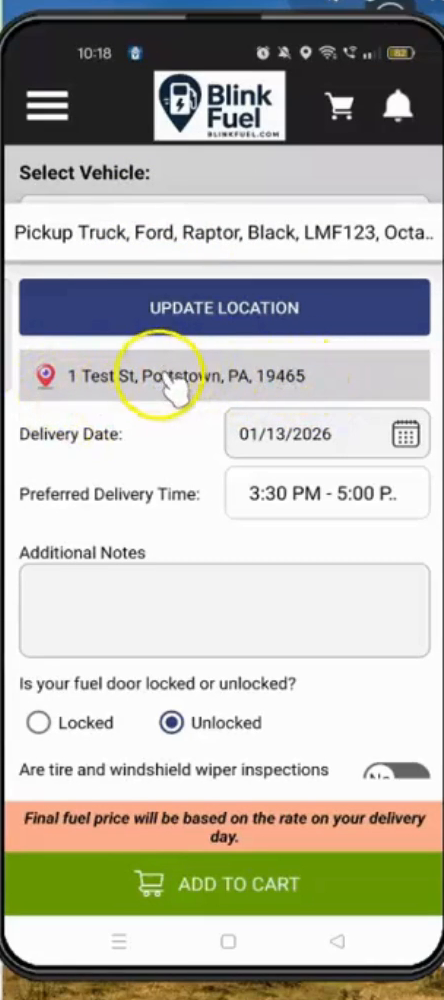
Look first at whose name the customer sees. If the app is not your logo, your colors, and your company in the iOS and Google stores, you are renting someone else’s relationship. Second, look at the driver phone and the dispatch board. If those are missing, you bought a storefront with no yard.
Third, look at fuels. Blink Fuel handles every fuel you sell: gasoline, diesel, heating oil, propane, kerosene, aviation gas and racing fuels. Fourth, look at records: order, driver, and completion. If the only proof is a text thread, you will feel that the first time someone asks you to show a date.
The features page is the product list to check against: easy ordering, payments in the app, push notices, live tracking, admin dashboard, driver management, route tools, and reporting. If a demo cannot open those screens, stop the demo.
Do you keep your own brand and customers?
You should. A white-label platform lists the app under your brand. Customers see your company, not the software vendor. You keep the customer list and the data. That is the difference between owning the tech and joining a network that holds the name.
Ask, on the demo, who owns the customer record if you leave. Ask where the data lives. Ask whether a consumer ever sees the vendor name on a receipt or a store listing. Blink Fuel’s stated model is licensed software with no franchise fee and no revenue share on deliveries. Confirm that in writing on your deal. Do not treat a marketing sentence as a contract.
Use the cancellation and customer-data export checklist to get the file format, timing, access end, retention and any charges in writing before you rely on taking records with you.
If you want the longer ownership argument, read why operators keep their own brand and customers. This guide only flags the test: your name on the phone, your list in your office.
Does the software cover the whole job?
The whole Blink Fuel product includes Tank Spotter, Custom Fuel App, and a custom website. Do not buy a customer app and assume the field side and the public site will appear later as extras. Ask what is in the instance you are buying, on day one, in your name.
Custom Fuel App is the customer ordering layer. Tank Spotter is the field-worker side of the same house. The custom website is the public face that matches the app. Blink Fuel is that whole product. If a salesperson talks only about the consumer app, ask where drivers work and where the company site lives.
Growth questions belong here too. The features page says you can start at one location or scale to more regions, and that the platform is built for high-volume deliveries and expanding fleets. That is a capacity claim, not a promise that your market will fill the trucks. Your volume is still your volume.
What records and tools does the driver get?
The driver needs a phone workflow: get the stop, run the route, complete the drop, and leave a record. Blink Fuel’s driver app covers routing and delivery completion. Dispatch assigns and tracks. Route tools pick an efficient path. That is the field job. Paper in the door pocket is not a plan for a national on-demand service.
Office tools sit next to that. The admin dashboard is the one place to run the operation. Analytics and reporting track orders, revenue, and customer trends. Recurring and subscription delivery exists for fleets that want a repeating window. None of that replaces your own books. It is the delivery side, from order to complete.
After a delivery is complete, what will your bookkeeper still enter in your own system?
Before committing to a platform subscription, ask for a proposed office handoff demo using one sample completed delivery, with fictional details only. Follow it into preparation of a billing record in your own system. Have your bookkeeper name that system and ask the presenter to show any claimed connection to it; do not assume the two connect.
- Ask what delivery information is available for preparing the billing record and what your office must supply separately.
- Ask who transfers that information into your system, who checks it against the sample delivery and when that check happens.
- List every manual step shown, including any re-entry, missing-information follow-up and review your bookkeeper would still do. Leave any step or claimed connection that cannot be demonstrated open for confirmation before you commit.
This proposed demo does not establish an accounting connector, an export format, automatic posting, payment settlement, tax calculation or reconciliation. Confirm the handoff with your bookkeeper; delivery tools do not replace your books. Use the demo request below to review it.
When a fleet pauses next week’s repeat fill, how do you check the driver’s stop list?
For the demo, use one fictional repeating fleet order. Ask the presenter to show how one future occurrence could be changed or paused, then compare that same occurrence in the customer view, dispatch list and driver stop list. Check the date, delivery location and whether the stop still appears before the driver uses the list. Also ask what happens to the later repeats.
Ask which steps remain manual, who checks each view and when the driver should use the revised list. If a view cannot be shown, leave that check open. This is a proposed demo, not confirmation of self-service pause or resume, automatic recurrence edits, duplicate prevention, calendar integration or successful sync. Use the existing demo request below to review the steps.
For what those records are for — and what they are not — read the sibling page What records does a mobile fuel delivery business keep? Software is not a license. Records help you show what happened. They do not write the code for your city.
What does setup cost, on the public list?
Public list for Blink Fuel is $11,000 setup and $1,100 per month. Source: the FuelSite.pro pricing page at https://fuelsite.pro/en/pricing/#pricing-section. Those are the only dollar figures this page prints. They are list, not a quote, and not a discounted deal.
Monthly support is how the platform stays updated. Encrypted payments and ongoing technical support are on the features list. A demo should still walk the payment flow and the support path. Do not skip that because a price is public.
If a number is not on that pricing page, do not invent it. PIMS pricing is not this product and is not printed here. Financing talk belongs on the financing pages in the Quick Start Guide, not in this checklist.
How do you compare a platform to building it yourself?
Building it yourself means you pay for design, app-store accounts, dispatch, routing, payments, and years of fixes. A platform means you launch on software that already does those jobs, then you run the fuel business. Blink Fuel’s comparison page exists for that split. Use it. Do not pretend a weekend of no-code is the same as a driver app in production.
A franchise comparison is a different split: ownership, fees, and who holds the customer. If you are choosing between “join a network” and “run your own branded app,” read Blink Fuel versus a franchise model and Blink Fuel versus DIY. This page will not restate those tables.
If you are still defining the category, start with What is on-demand fuel delivery software? Then come back to this list with a demo booked.
What should you ask on a demo?
Ask to place a gasoline or diesel order in a branded app. Ask to see the driver phone take that stop. Ask to complete the drop and find the record on the board. Ask who owns the customer if you leave. Ask what is included besides the consumer app: Tank Spotter, Custom Fuel App, and the custom website. Ask for the public list price and the current contract, not a verbal maybe.
After the completed drop, use the unfinished-stop demo checklist to ask the driver and dispatcher to show the status, reason and office handoff when a delivery cannot be completed.
Ask what the software does not do. Blink Fuel does not deliver fuel, does not sell you a territory, and does not promise profit. If a demo leans on income claims, walk. The footer on this site already says results depend on your market, equipment, costs, and execution.
Then book the walkthrough on your own routes. Request a demo, call 610-220-3906, or use the demo videos if you want the loop before a call.
Keep the route math next to the software checklist. Use the fuel delivery calculator to test your own fills, fuel margin and costs for one, two or three trucks.
Last reviewed: September 2026
Author: The Blink Fuel team