A mobile gasoline or diesel delivery business should keep a dated record of the order, the driver, the place, and the completed drop. Blink Fuel’s driver app and dispatch board are built to hold that loop. The software is not a fuel license, a permit, or a substitute for current code text.
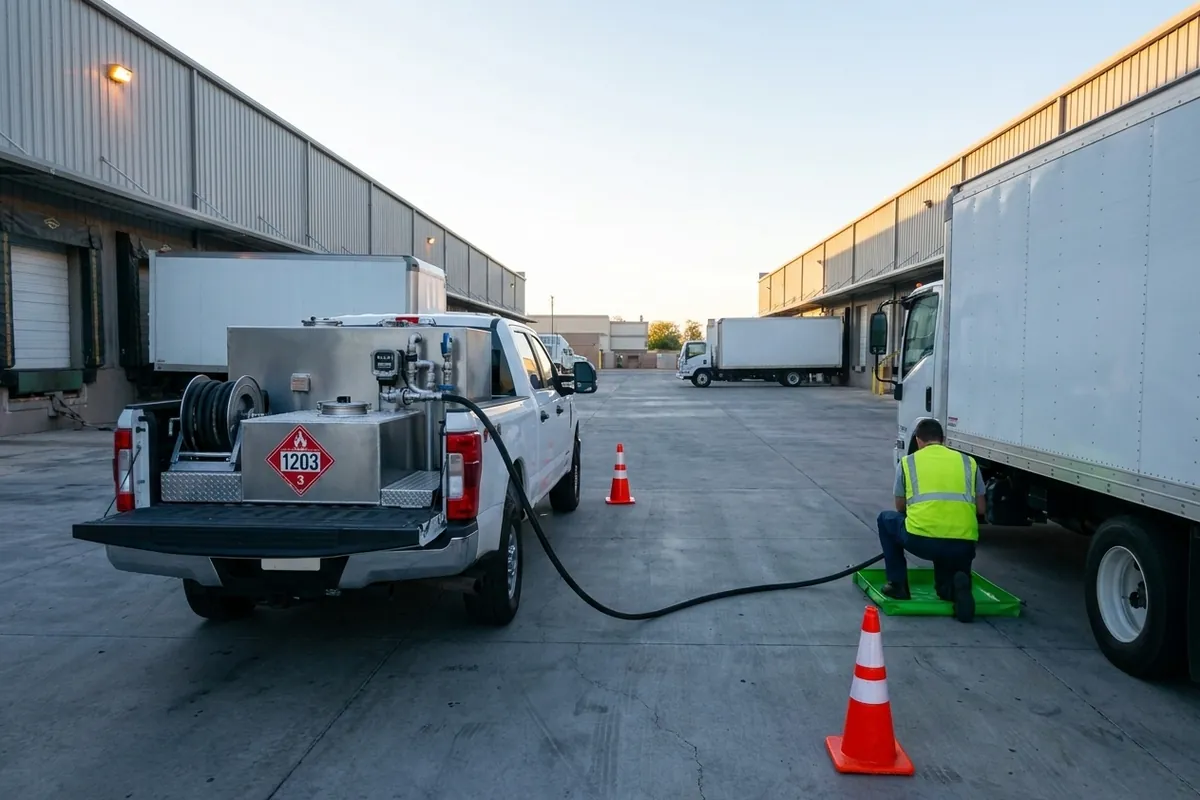
This page is for operators who will run on-demand fueling under their own brand. It is not legal advice and it is not a state-by-state chart. Rules change. Your fire marshal, DOT officer, and insurer read the current text. We do not invent clause numbers here.
What records does the software keep?
The working record is the order-to-complete trail: who ordered, what fuel, where, when, which driver, which route, and that the drop was marked done. Blink Fuel’s admin dashboard, driver management, routing, and delivery completion exist to hold that trail in one place instead of a wet form in the door pocket.
Customers also see pieces of that trail. Push notices cover confirmation, dispatch, and delivery. Live tracking shows progress from start to finish. Payments sit on the same order. Recurring and subscription jobs should still leave a dated stop each time, not one fuzzy standing note.
Reporting then lets you look across orders, not only at one ticket. That is useful when a fleet account asks what you ran last month, or when you need to see which driver closed a window. It is still your record. Export and retention rules are your office policy plus whatever your insurer and your local authority require. Confirm those on a demo. Do not assume an infinite archive.
See the features page for the dashboard, driver tools, routing, payments, and notices that create this trail.
Does software replace a fuel license or permit?
No. An app does not replace a business license, a fuel or motor-fuel permit, driver qualifications, insurance, or a local operating OK. Blink Fuel is software. You still line up trucks, product, people, and permission. If a salesperson says the app “covers compliance,” ask which document it prints, and who signed that it is enough in your city.
Mobile fueling sits under a mix of fire, environmental, transportation, and business rules. Those texts live at the federal, state, and local level, and they are not the same in every county. This page will not quote a code section we have not read in the knowledge set for this site. Check the current code text with the authority that actually inspects you.
If your counsel or your fire marshal names a standard, read that edition, not a blog summary. Do not copy a clause number from another company’s website onto your own binder.
What should you check with your local authority?
Ask who in your city or county signs off on mobile gasoline and diesel delivery. Ask whether you need a site plan, a parking rule for the truck, hours, or a notice to the fire department. Ask what they want to see after a spill or a complaint. Then match your software records to that ask, instead of the other way around.
Transportation rules for fuel on a truck are a separate stack from the app. Driver files, vehicle files, and any hazardous-materials paperwork stay in your safety office even if the order lives on a phone. Blink Fuel does not replace those files. If you already run a fuel truck, you already know this split. If you are new to fuel, get a qualified advisor before you take the first paid stop.
Insurance will have its own list. Carriers often want proof of training, proof of inspections, and a way to show what happened on a date. A dispatch record and a completion mark help. They are not a policy. Send the carrier what they ask for, in the form they ask for.
How do order and delivery records help after a stop?
They help you answer “show me.” After a billing dispute, a damaged vehicle claim, or a “the driver never came” call, you need the order, the window, the driver, and the completion. A text thread is weak. A board record with the stop closed is stronger. Photos, if you take them, should sit on that same record, not in a random camera roll.
Demo checklist: can the office retrieve the same delivery record?
Ask to walk through one sample delivery on the actual board and driver phone. Then have someone in the office retrieve that same record without help from the original driver.
- Order: Find the sample order and match the customer, fuel and delivery location.
- Driver: Show which driver was assigned to that delivery.
- Window: Find the delivery window on the same record.
- Completion: Show where the stop was marked complete and what the office can see.
- Attachments, if captured: If a meter photo or signature was captured in the demonstrated configuration, ask to see where it sits with that delivery record and have the office retrieve it too. If neither was captured, note that gap.
Use this as a demo test, not a promise that every configuration includes photo or signature capture. Note what the office could retrieve and what was missing. A completion mark alone does not verify gallons or settle a dispute; confirm export access and retention separately.
They also help inside the company. Dispatch can see which driver is on which job. A new dispatcher can pick up a route without a verbal handoff. You can see no-shows and cancellations without guessing. None of that is a marketing statistic. It is the reason you bought software instead of a pad of tickets.
Be honest about the limits. If the phone is dead, that stop is not entered until it charges. If a driver skips the complete step, the record is wrong. Training and a required field beat a hope that everyone will remember. Truck chargers are a real requirement, not a nice-to-have.
What about driver and truck paperwork?
Driver qualification, medical cards, tank and hose care, and any spill kit checks are still paper or a field app meant for that job. Blink Fuel’s whole product includes Tank Spotter as the field-worker side, plus Custom Fuel App and a custom website. Ordering software does not magically become your entire safety file.
Keep the split clean in your head. Custom Fuel App is how the customer orders. Dispatch and the driver app are how the load is assigned and closed. Tank Spotter is the field-worker tool in the same product family. Your website is the public face. Mixing those jobs into one vague “the app handles safety” sentence will fail the first audit conversation.
If you are choosing a platform, the buyer guide How to choose a fuel delivery app lists this split as a demo test. If you still need the category definition, start with What is on-demand fuel delivery software?
How does Blink Fuel fit this job?
Blink Fuel holds the commercial loop: branded ordering, payments, dispatch, routing, driver completion, notices, and reporting. That is the record of the delivery job. It is the right tool for “what did we run today.” It is the wrong tool to treat as a permit, a training certificate, or a fire-code approval.
List pricing for the product is $11,000 setup and $1,100 per month, published at https://fuelsite.pro/en/pricing/#pricing-section. Price does not buy a license. It buys the software and the ongoing updates stated on the features page.
Blink Fuel still does not deliver the fuel, does not sell you a territory, and does not promise a result. Your AHJ, your insurer, and your own safety file sit beside the software. Keep them beside it on purpose.
What should you do before you launch?
Write down who in your state and city you must talk to. Read the current code text they point you to. Line up insurance. Decide how long you will keep order records and who can export them. Train drivers to close every stop. Then run a demo of the actual board and the actual phone, not a slide.
If a rule is unclear, stop and ask. Do not guess a clause number. Do not copy another operator’s binder. Do not let a vendor invent a standard for you. Check the current code text. Then set the software to capture the fields that text will ask you to show.
Request a demo if you want that walkthrough. Call 610-220-3906. Watch the order-to-delivery videos first if you want the loop on a screen.
Your delivery volumes can help you plan the math. Enter your own fills and gallons, plus your margins and costs, in the fuel delivery calculator. Its starting figures are examples, not results from your records.
Last reviewed: September 2026
Author: The Blink Fuel team